So, you've started collecting icons in the Treasure Hunt and now you want to share the love? Whether you're feeling generous or just want to help a fellow Kinkster complete their set, gifting an icon is easier than it seems. Here's how it works:
First things first: to gift an icon, you need to find a member who doesn’t have icons. Visit their profile and if they’re missing it, you’ll see the “Give away icon now!” button appear. Tap it, and voilà, one of your icons is instantly gifted to them.
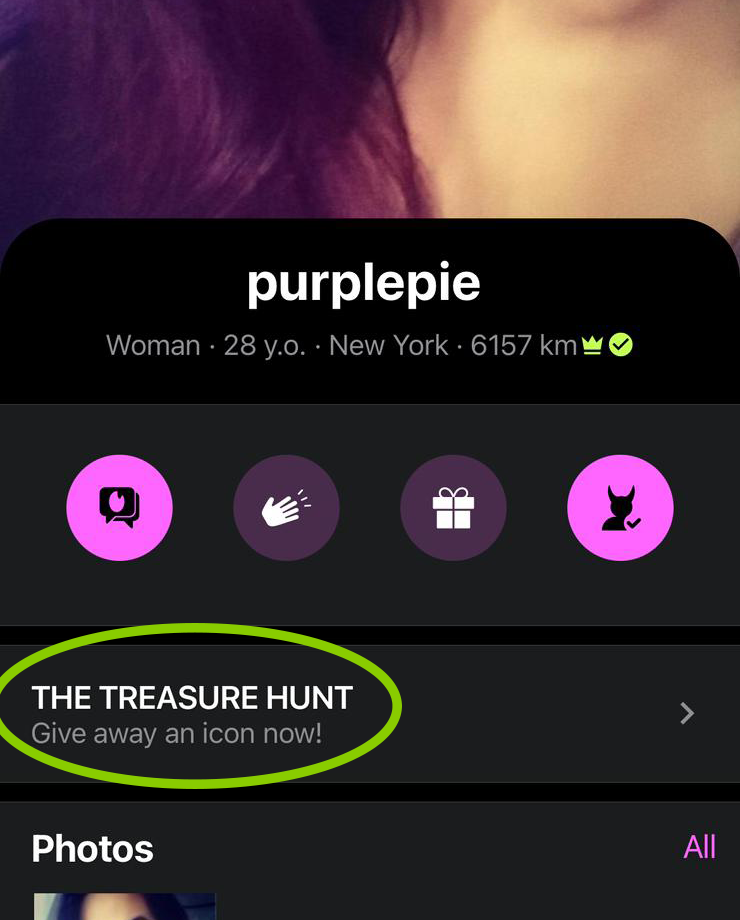
💡 But here’s the catch: once you give an icon away, it’s no longer in your collection. You’ll need to go back to the place you originally found it and collect it again. Think of it as a kinky scavenger mission with a twist of generosity.
Planning to gift multiple icons throughout the game? Here’s a pro tip:
Keep a personal list or grid of where you’ve collected each icon. Why? Because when you gift one, the system chooses a random icon from your stash and, unless you’re tracking what came from where, you might find yourself scrolling endlessly trying to remember.
A little strategy goes a long way. Gifting can be a fun, collaborative way to play, especially when the community bands together to help each other find the 24 icons.
Now you know. Ready to spread the word? Share this info with everyone.
-
 151
151
YOU MAY ALSO LIKE
Similar discussions
-
- 64 replies
- 628 views
-

- De****
-
- 1,438 replies
- 29,446 views
-

- FE****
-
- 1,994 replies
- 35,452 views
-

- Bu****
-
- 1,956 replies
- 38,600 views
-

- VK****
-
- 1,384 replies
- 27,293 views
-
- FE****
Join the conversation
You can post now and register later. If you have an account, sign in now to post with your account.